
You’ve rolled out Microsoft 365 Copilot. How do you manage usage and costs while keeping access useful and spending in step with what your organisation needs?
Think back to the mid-2010s, when everyone seemed to want a new laptop. IT was lumped with the budget, requests became overwhelming, and there was always the concern that another purchase would barely get used. It was an annoying position to be in, not a model worth repeating.
We need to do better with Copilot. There’s a subscription commitment to manage alongside monthly consumption costs that can grow as people adopt new capabilities. At Codify, we think the business needs to help shape those decisions, rather than leaving IT to carry the budget and guess where the value is.
Why Copilot Needs a Different Approach
Microsoft 365 hasn’t historically needed this kind of usage-led cost management. Everyday services such as mailboxes, Teams and SharePoint are generally provided according to roles and entitlements. IT optimises the stock keeping unit (SKU) mix, checking whether eligible frontline staff suit F-series plans, rather than treating every plan as interchangeable.
Copilot calls for closer attention to adoption, demand and spending. This shared practice of managing spend is known as FinOps. IT, finance and business leaders each bring part of the picture.
In our experience, Microsoft’s emails identify who consumes, but reporting sits in multiple disconnected, IT-facing places. Useful evidence exists. Turning it into a departmental conversation takes more work.
What Reporting Does Microsoft Provide?
Microsoft provides several reporting tools, each answering different questions:
| Tool | What It Shows |
| Microsoft 365 admin centre usage reports | Active users and application adoption |
| Copilot Dashboard in Viva Insights | Usage, adoption and organisational insights, subject to access prerequisites |
| Copilot Credits report | Metered agent consumption |
| Azure Cost Management | Linked subscription charges and billing analysis |
Credits measure consumption; they aren’t dollars or an invoice. Exports can support comparisons, but usage and adoption in Viva Insights and billing in separate Azure views don’t provide a joined-up departmental perspective.
Four Action Areas for Managing Copilot
1. Is the Right Licence With the Right User?
Departments and individual staff adopt AI at different rates. Some are experimenting occasionally; others already rely on it throughout the day. Licence allocation should reflect that adoption and the capabilities people need, with managers explaining the work and IT checking the access options.
Not every supported Copilot experience requires the full paid Microsoft 365 Copilot licence. Pay-as-you-go (PAYG) access through Azure offers a flexible entry for occasional use of supported experiences, such as metered agents in Copilot Chat. PAYG consumption doesn’t require an annual upfront consumption commitment. As adoption and demand increase, a paid licence may become more economical. Ignoring the flexible option means missing part of the allocation decision.
For comparison, Microsoft’s Australian enterprise pricing advertises the add-on at AU$44.90 per user/month, paid yearly on an auto-renewing annual subscription, excluding goods and services tax (GST). A qualifying Microsoft 365 licence is additional; contracted prices and available terms may differ.
Compare purchased, assigned and active seats, then discuss low activity. Training, access problems or long service leave may explain it. Reassignment can make sense with manager input and applicable licensing terms, but doesn’t reduce an existing subscription commitment.
2. Where Does PAYG Meet the Licence Inflection Point?
Once people are using PAYG, review their actual usage and charges over a representative period. If activity is increasing, finance can compare those costs with the licensed offer, while managers explain whether demand is likely to continue and IT checks the required features. That’s the point to consider switching, not simply when someone becomes a frequent user.
The comparison needs to cover what people actually use. Someone who occasionally asks an agent questions about internal SharePoint content may suit PAYG agent access.
Someone who relies on the full Copilot experience in Word and Excel, including deeper integration with their organisation’s work data, may justify a paid licence. That doesn’t mean everyone else has no Copilot in those apps: eligible users can have standard access without the add-on, depending on their licence and tenant configuration.
Some advanced experiences still require both a paid licence and additional consumption spending. Savings depend on actual use and the terms for those features, not a universal break-even number.
3. Can Departments Understand Their Own Team’s Usage?
Showback gives managers a regular conversation about their team’s activity, licence commitments and relevant shared spending. A department can explain a temporary increase, identify people who need support and share what has worked or failed. That context helps managers decide future demand and cost expectations with IT, rather than just receiving a bill they can’t explain.
Finance still reconciles charges, and IT checks department mappings and reporting periods. Discuss Azure spend alongside adoption without pretending it is an exact departmental allocation. Where costs are shared, keep them shared. Managers need an appropriate team summary, not unrestricted access to colleagues’ prompts.
4. Are People Using the Right Tool With Support?
Useful adoption isn’t simply more interactions. Managers can help people choose the right platform for the job, understand how to review its output and know what spending is expected. A simpler tool may sometimes be the better fit. Sharing a successful drafting approach or an unreliable answer gives IT practical material for guidance and training.
Be transparent about what is monitored and why. Appropriateness signals should support conversations about the task, the tool and the help someone needs, with human judgement and access limited to those who need it. They aren’t an assessment of staff competence or a basis for employee rankings or employment decisions.
How Copilot Monitor Supports This Approach
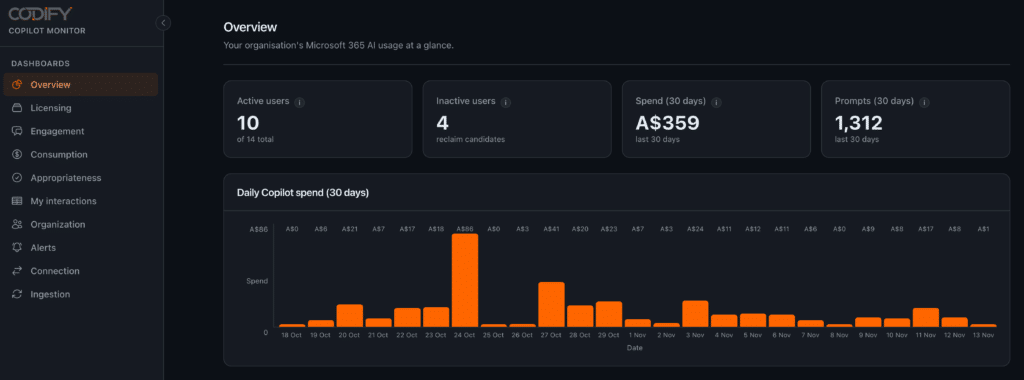
Copilot Monitor brings licence utilisation, recorded activity, Copilot-related Azure spend and sampled governance signals into one portal.
Its live licence view highlights recognised Copilot licences and idle candidates for discussion. Activity views show adoption across detected interfaces, departments and users. Linked-subscription Azure spend sits alongside that activity, rather than being allocated to individual people or departments, and doesn’t include the licence subscription bill.
Sampled, role-aware assessments offer indicative business-relevance signals for human review. They help inform the supportive conversations above, not establish productivity or business value. Staff can also inspect their own recorded interactions. Sampling applies to assessment, not necessarily to collection of available prompt content.
Bringing the Approach Together
We don’t need to repeat the laptop-budget frustration with a new subscription. When IT, finance and department leaders understand adoption together, they can make better-informed decisions about access, support and spending, then check whether those decisions are helping.
If you’d like to explore what that could look like in your organisation, get in touch about Copilot Monitor for an obligation-free conversation.