
Most development teams planning the migration from Azure DevOps to GitHub assume it just plugs into Entra ID and everything magically works.
It’s a fair assumption, after all, GitHub is part of Microsoft, right?
But dig beneath the surface and a very different picture emerges.
Developer identities, access boundaries, PAT token sprawl, code exposure, and lifecycle management all behave very differently depending on which GitHub identity model you’re using. We see it all the time when helping customers modernise on Azure and identity related issues are almost always the root cause of unexpected gaps in the migration plan and can lead to security concerns.
The Three Identity Models GitHub Uses (and Why They Matter More Than You Think)
GitHub supports three identity types, but only one behaves the way enterprises expect. Here’s what’s really going on behind each option.
1. Personal GitHub.com Accounts (Bring Your Own Account)
This is the classic model. Developers sign into GitHub using their personal GitHub.com account and get invited into your organisation.
On the surface, it feels simple. In practice, it means:
• The user owns the identity, not your organisation
• MFA is controlled by the user
• PAT tokens, SSH keys and credentials live outside corporate governance
• Offboarding only removes them from your org, the identity lives on
• Public and private work coexist in the same identity
• Conditional Access cannot be guaranteed end-to-end
This creates a governance and compliance headache for the organisations we help.
2. GitHub Enterprise Cloud (Standard Enterprise Account)
This introduces enterprise policies, enforces SSO, and improves administration — but there’s an important detail. The setup still uses the developer’s personal GitHub.com account. That account is linked to the organisation’s Identity Provider (IdP), so the developer’s identity within the enterprise is tied to their personal GitHub credentials.
Organisations get:
• Enforced SAML/OIDC SSO
• Centralised policies
• Some PAT restrictions within the org
But do not get:
• Identity lifecycle control, you need to create new accounts for staff and remember to delete them when they leave the organisation
• Enforced MFA, but still user managed
• Separation between personal and corporate activities
It improves consistency but does not deliver full governance.
3. GitHub Enterprise Managed Users (EMU)
This is the enterprise-ready model because it eliminates reliance on personal GitHub accounts. Instead, user identities are fully managed through the organisation’s Identity Provider (IdP), ensuring centralised control, compliance with enterprise policies, and streamlined onboarding/offboarding. This approach provides stronger security, consistent governance, and simplifies administration compared to linking personal accounts.
With EMU:
• The organisation owns every GitHub identity
• Users authenticate exclusively via Entra ID
• SCIM drives full lifecycle automation
• Public GitHub usage is blocked
• Conditional Access, risk policies, and MFA apply everywhere
• Usernames, email addresses, and identity attributes are all governed centrally
• Credential sprawl is eliminated
This is GitHub operating as a controlled enterprise application in Entra ID.
Comparison Table: Identity Ownership & Security Controls
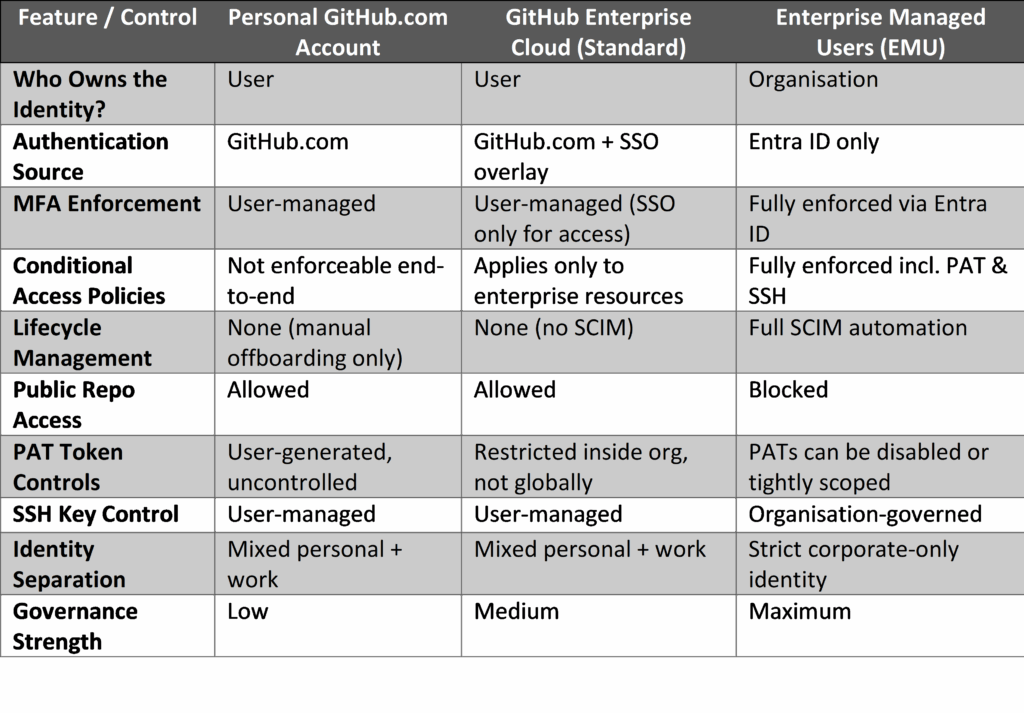
Why EMU Is Becoming the Default Identity Model for Organisations
1. It eliminates personal/corporate identity overlap
No more developers mixing personal and work activity.
No more accidental pushes to public repos.
No more ungoverned PATs or SSH keys.
2. GitHub falls under your Entra ID security policies
Conditional Access, MFA, risk scoring, device trust are all inherited automatically.
3. It closes real security gaps
The most frequent issues include leaked Personal Access Tokens (PATs), accidental exposure of sensitive code in public repositories, and orphaned accounts left active after offboarding. With EMU, these risks are eliminated because identities and access are fully managed through the organisation’s IdP, ensuring strict governance and lifecycle control.
4. It automates lifecycle management
SCIM ensures user accounts are created, updated, and removed automatically based on HR and IT processes. This means access is revoked as part of formal offboarding workflows, eliminating reliance on manual clean-up and reducing the risk of orphaned accounts.
Provisioning EMU: The Practical Steps That Matter
Here’s the real-world sequence we use when enabling EMU for organisations.
Step 1: Choose Your EMU Tenant Identifier and Hosting Region
GitHub requires a globally unique short code for Enterprise Managed Users (EMU).
It appears in your enterprise URL and admin username. While GitHub recommends 3-5 characters, codes up to 20 characters are allowed. Once set, it cannot be changed.
At the same time, nominate your hosting region. For Australian organisations, choose Australia for:
- Low latency
- Better Codespaces performance
- Local data residency
- Alignment with broader Azure strategy
This request must be submitted via a GitHub partner. Don’t have one? We can handle the entire provisioning process for you.
Step 2: Prepare Your Entra ID Admin & Developer Groups
Create two base groups:
- GitHub EMU Admins
- GitHub EMU Developers
These are essential for SCIM-based provisioning and automated team assignments.
Step 3: Nominate an Azure Subscription for Billing
GitHub Enterprise Cloud needs a billing connection.
You can use:
- An internal Azure subscription, or
- Azure CSP billing if you prefer consolidated partner-managed invoicing
This keeps GitHub in the same financial ecosystem as the rest of your Microsoft services.
Step 4: Configure SSO (SAML or OIDC) & SCIM
This enforces:
- MFA
- Conditional Access (best with OIDC)
- Device compliance policies
- Risk-based access
- Consistent identity across all systems
SCIM Provisioning
SCIM handles:
- Automatic creation of GitHub accounts
- Attribute synchronisation
- Group → team mapping
- Automatic disabling on offboarding
It transforms GitHub from “another system with logins” into a tightly governed enterprise platform.
EMU isn’t just another feature – it’s about aligning identity
If your organisation is migrating from Azure DevOps to GitHub, establishing the right identity model isn’t a nice to ‑have, it’s foundational. The old personal account‑ approach worked when GitHub was primarily an opensource platform, but it simply doesn’t hold up when you’re moving enterprise workloads, protecting IP, or operating‑ under compliance requirements.
Implementing Enterprise Managed Users (EMU) ensures GitHub inherits your Entra ID governance model from day one, closes meaningful security gaps, and restores identity control to where it belongs: your identity provider.
Ready to Move Your Application Development to GitHub?
If you’re planning a GitHub migration or want to enable EMU as part of your Azure DevOps transition, we can help design, implement, and operationalise the identity model properly so your GitHub adoption is secure, governed, and future‑proof. Get in touch for an obligation free chat!
Explore more of our technical insights:
Mastering GitHub Codespaces CLI: A Developer’s Guide
Enhancing Secure Development with GitHub & Azure DevOps
Your Azure Project Just Got a Major Co-Investment from Microsoft
The Shift from Microsoft EA to CSP: What It Means for Your Business